Baby Sleep Tracker: Lulla
- 4.8
- Rating
- 10.00K
- Installs
- Free
- Price
 Analysis by App-foxy
When a baby’s sleep is unpredictable, the hardest part is often not noticing that something went wrong; it is remembering exactly what happened afterward. A nap starts late, a feeding interrupts bedtime, one parent takes over during the night, and by morning the details are already blurred. Lulla, a parenting app from Lulla, is built around making that daily picture easier to follow while also helping create a calmer settling routine.
I approached it as a practical baby sleep tracker rather than a magical sleep solution. Its purpose is to bring sleep records, soothing tools, and shared care closer together. The app is free to start, is rated for Everyone, and has attracted a 4.8 average from over 400 ratings. That combination makes it appealing to tired parents who want something more focused than a general notes app, although its optional purchases mean the free experience should be assessed before committing to a long-term routine.
From a difficult night to a usable sleep record
I find the most useful starting point is the moment a hard night needs to become something you can learn from, rather than a score to worry over. This section looks at how a few timely notes can make the next handoff and bedtime decision clearer, while keeping the app’s calming tools in their proper supporting role.
You May Also Like

 Blood Strike: 2.5 Anniversary
Blood Strike’s Loadouts Turn Every Drop Into a Tactical Gamble
A close look at Blood Strike’s custom loadouts: how fast access to signature weapons reshapes its battle royale rhythm, rewards preparation, and narrows the gap between fights.

 Pandora - Music & Podcasts
Pandora’s Music Is Easy to Start, but Harder to Recover
Pandora’s strength is its low-effort path from a seed to a station. Its weak spot is how much confidence it asks you to place in connection, setup, and quiet recovery.

 8 Ball Pool
 Is Built on Rivalries, Rematches, and Routine
A close look at the rivalries, rematches, shared routines, and unanswered safety questions that turn a quick pool match into a persistent mobile community.

 Samsung Music
’s Quiet Strength Is Playing What You Already Own
Its reach comes less from spectacle than from dependable access to a personal library. That simplicity is both the app’s strongest retention engine and its ceiling.

 AccuWeather: Weather Radar
AccuWeather Review: A Quick, Clear Forecast for Everyday Decisions
For everyday plans, the best forecast is the one you can understand quickly. AccuWeather makes rain timing, radar, and local conditions easy to act on, with a few trade-offs.

 Hill Climb Racing
Why Hill Climb Racing Still Turns Crashes Into One More Run
A tiny car, a bumpy hill and one more upgrade: Hill Climb Racing keeps resurfacing because its simple chaos makes every near-miss feel personal.
More From Our News Desk
View All News


Beginning with the real problem: scattered information
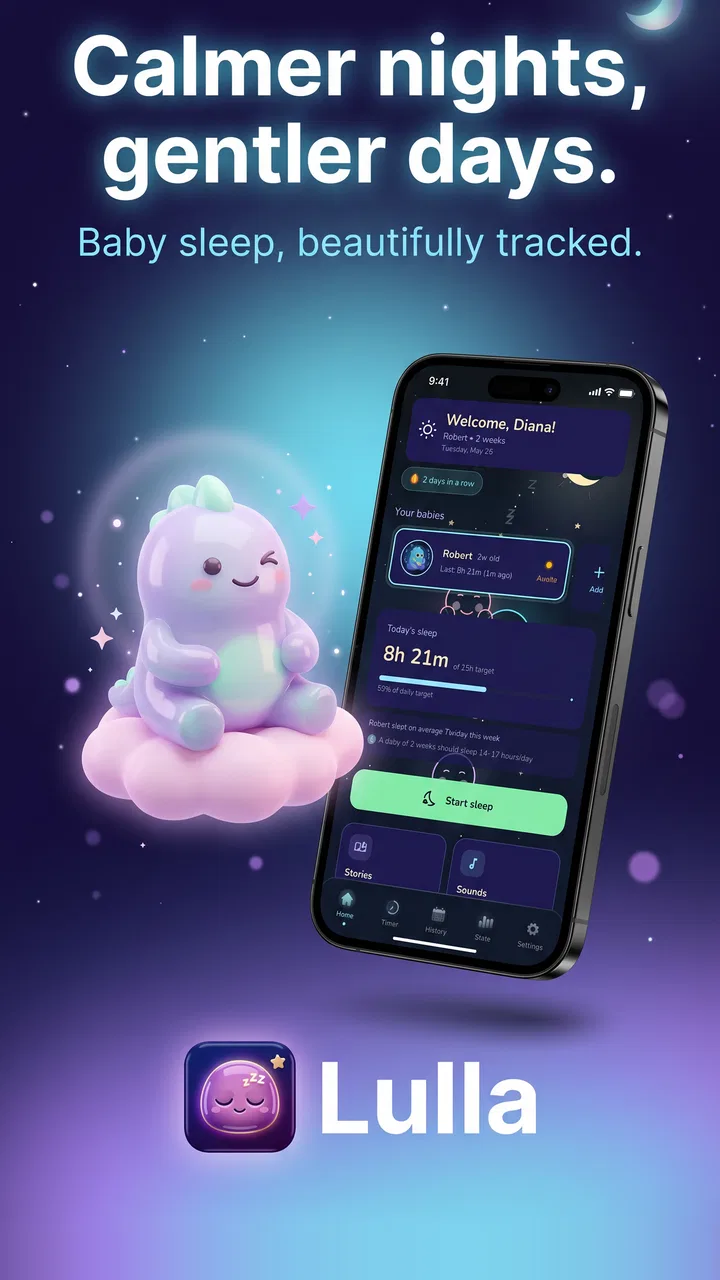
The most useful way to approach Lulla is to open it at the moment when the household needs clarity, not when everything is already organized. Imagine a baby who has taken short naps all day and is now unsettled at bedtime. I would use the app first to record what is happening, then move to its calming material instead of switching between a tracker, a sound app, and a separate story service.
That single-app workflow matters during the evening. Parents rarely have spare attention for a complicated system, and a sleep record is only valuable if it can be updated while holding a baby or working in low light. Lulla’s focus on scoring nights, tracking sleep, and supporting soothing puts the important tasks in one parenting context.
The word “score” should not be treated as a medical verdict or a judgment about parenting. I see it as a way to turn a messy night into a quick reference point. A difficult score can prompt a closer look at the timeline, while a better one can show that a change in the bedtime routine was worth keeping. The number is useful only when read alongside what actually happened.
Recording the night without turning care into paperwork
My preferred workflow would be to update the record at natural handoffs: when the baby goes down, wakes, starts a nap, or finishes one. That is more realistic than trying to reconstruct every detail in the morning. The app’s value depends heavily on this habit, because incomplete entries can make a night appear simpler or more chaotic than it really was.
A practical tip is to decide in advance what level of detail the household can maintain. If both parents record every small interruption inconsistently, the timeline may become confusing. If they agree to capture the main sleep periods and notable wake-ups, the record is more likely to remain useful. This is one of the less obvious trade-offs: a lighter, consistent log can be more informative than an ambitious record that gets abandoned after two nights.
For parents caring for more than one child, the multi-baby support is especially relevant. It avoids forcing the entire household into one shared sleep profile, which is important when siblings have different schedules. I would still keep each child’s routine conceptually separate when reviewing the night, because combining patterns too casually could hide the very differences the feature is meant to clarify.
Moving from tracking to soothing
Once the sleep event is recorded, Lulla’s stories, sounds, and calming content provide a natural next step. I like this connection because it reduces the number of decisions required at bedtime. Instead of logging a wake-up and then searching elsewhere for something to settle the baby, the parent can continue within the same general workflow.
The best use is not to play something automatically every time the baby stirs. I would first check whether the baby needs feeding, changing, contact, or another form of care. Sounds and stories are supportive tools, not substitutes for responding to those needs. When the child is already comfortable but struggling to wind down, the calming material makes more sense.
There is also a useful distinction between creating a familiar cue and constantly changing content. I would try one gentle option for several evenings before deciding whether it helps. Switching sounds or stories repeatedly may make it harder to tell whether the routine is working. Lulla can support consistency, but the parent still has to supply the consistency.
Using stories and sounds with realistic expectations
Stories may suit a baby who responds well to a quiet voice and a predictable bedtime sequence, while steady sounds may be more appropriate when the room itself is distracting. The choice depends on the child and the situation. A story can become part of a wind-down ritual, whereas a sound may be less demanding when the parent is already exhausted.
I would also treat volume and placement as part of the routine rather than assuming the app solves them. The phone should not become the center of the sleep environment, and a parent should remain attentive to the baby instead of leaving the app to manage the night. Lulla’s strength is convenience, not independent supervision.
The no-ads approach is a meaningful comfort during bedtime. Advertising would be particularly disruptive in a parenting tool used beside a sleeping child, so avoiding that distraction supports the app’s calm purpose. Still, “no ads” does not mean every part of the experience is necessarily free: in-app purchases range from $10.99 to $69.99 per item. I would explore the available free material first and only pay if the extra content clearly fits the family’s routine.
Handling the handoff between caregivers
The handoff is where a tracker can earn its place. Suppose one parent handles the early evening and another takes the later shift. A quick look at the record can answer practical questions: when did the baby last sleep, how long has the current settling attempt lasted, and was the child already unsettled earlier? That is more useful than relying on a tired verbal summary.
For this to work, both caregivers need a shared recording style. One person might log every brief stir while the other records only full wake-ups. The app cannot correct that difference by itself. I recommend agreeing on simple household rules, such as recording the start and end of main sleep periods and adding only the interruptions that changed what the caregiver did.
Multi-baby support also changes the handoff conversation. A caregiver can focus on the correct child rather than sorting through one blended family timeline. That matters in households where one baby is napping while another is awake, because the most common tracking error is not forgetting an event entirely but attaching it to the wrong child.
Another useful practice is to review the previous night before the next bedtime, rather than staring at the record during every difficult moment. The app is better used as a lightweight memory aid than as a source of constant checking. Over-monitoring can increase parental anxiety, especially when a score appears to turn normal variation into a problem.
What the result can tell you
After several days, the record may help reveal practical patterns: whether late naps tend to make bedtime harder, whether a particular soothing approach is worth repeating, or whether the baby’s sleep is changing as circumstances change. I would look for repeated tendencies, not a single unusually good or bad night.
This is where Lulla differs from a simple alarm or a paper notebook. A notebook can be flexible, but it requires the parent to organize the information later. A basic timer can capture duration, but it does not bring stories, sounds, and calming support into the same bedtime flow. Lulla’s advantage is the combination of tracking and settling tools, especially for parents who want one focused place to manage both.
It is also more approachable than a highly technical sleep system for someone who wants everyday guidance rather than elaborate analysis. The trade-off is that a simpler experience may not satisfy parents looking for extensive medical-style reporting, detailed developmental interpretation, or a full household health dashboard. I would choose Lulla for routine awareness and bedtime support, not as a diagnostic instrument.
The app’s current version is 4.14.0, and it supports devices running Android 8.0 or later. For a parent deciding whether an older phone can handle it, that operating-system requirement is the key practical check. The app has passed 10K+ installs, so it is not an obscure personal experiment, but its relatively focused audience means I would still judge it by the workflow rather than by popularity alone.
A realistic evening with Lulla
Here is how I would use it on an ordinary difficult evening. The baby wakes from a short late nap, feeds, and remains fussy. I record the wake-up and the next sleep attempt while the details are fresh. Then I choose a calm story or sound, keep the rest of the room quiet, and give the baby time to settle without repeatedly changing the selection.
If the baby falls asleep, I record the new sleep period. If the baby remains upset, I stop treating the app as the answer and return to basic care: checking comfort, hunger, temperature, and the need for physical reassurance. Later, when another caregiver takes over, the record provides a concise starting point. The next morning, I review the night as a whole instead of judging the bedtime attempt in isolation.
The important outcome is not a perfect score. It is a clearer handoff and a more repeatable routine. If the same late nap repeatedly precedes a difficult bedtime, that is a useful observation. If the sounds help only when the room is already calm, that is useful too. Lulla works best when its records support decisions rather than dictate them.
Where the workflow becomes less comfortable
The first point of friction is the need to keep logging. Any tracker becomes less helpful when updates are delayed or inconsistent, and baby care is exactly the kind of environment where that happens. A parent who dislikes recording events may find that Lulla creates another obligation instead of reducing mental load.
The second limitation is the risk of overinterpreting the score. Sleep varies for many ordinary reasons, and a single poor night should not lead to dramatic changes. I would avoid using the score to compare children or to measure parenting success. It is a summary for reflection, not a clinical assessment.
Paid content is another consideration. The app is free, but the presence of purchases between $10.99 and $69.99 per item means families should be comfortable evaluating optional content before spending. If a parent wants a completely free tracker with no purchase decisions, a basic notes tool may feel simpler. That alternative will not offer the same integrated calming experience, but it may be enough for recording times.
There is also a point at which another type of app is better. Parents who need medical symptom tracking, feeding records, medication reminders, or broad child-development logs may prefer a more comprehensive parenting platform. Parents who only need white noise may find a dedicated sound player less distracting. Lulla makes the most sense in the middle: for families who want sleep tracking plus bedtime support without turning the phone into a full care-management system.
Who will get the most from it
I would recommend Lulla to new parents who are losing track of naps and night waking, caregivers who alternate shifts, and families with more than one baby to monitor. It is particularly suitable when the main problem is fragmented information: nobody is sure when the last nap ended, what was tried at bedtime, or whether the same pattern has appeared before.
It can also help parents who want a gentle routine rather than aggressive sleep optimization. The stories, sounds, and calm-oriented approach feel more appropriate for supporting a peaceful transition than for chasing a rigid target. That makes it approachable during the early months, when schedules can change quickly.
I would be more cautious about recommending it to someone who wants precise professional interpretation or who finds sleep scores stressful. It is also not the right choice for a family unwilling to log events, because the tracking side cannot provide useful patterns without dependable input. In those cases, a simpler manual method or a broader parenting app may be less frustrating.
My final take on Lulla
After looking at the complete path from a wake-up to the next caregiver handoff, I see Lulla as a focused companion for making baby sleep easier to remember and bedtime easier to organize. Its strongest idea is the connection between the record and the calming tools: the parent can note what happened, try a story or sound, and later judge the result with more context.
The app is free, carries an Everyone age rating, and comes from Lulla with a 4.8 average across over 400 ratings. Those details make it a credible option to try, while the optional purchases mean I would begin with the free experience and avoid assuming that every useful element is included without cost.
My recommendation is to use it as a calm record of the family’s routine, not as a judge of the baby or the parent. If you want multi-baby tracking, shared bedtime context, and soothing content in one place, it is worth trying. If you need medical monitoring, extensive reports, or a completely hands-off solution, choose something else. Used with modest expectations and consistent entries, Lulla can turn a confusing series of nights into information that actually helps with the next one.
FAQs for Baby Sleep Tracker: Lulla
01What is Baby Sleep Tracker: Lulla, and who is it designed for?
Baby Sleep Tracker: Lulla is a sleep-monitoring and recording app designed to help parents understand their baby’s daily rest patterns. It can be useful for newborns and young children whose sleep schedules change frequently. Parents can typically use it to record naps, nighttime sleep, awakenings, and related routines, creating a clearer overview to discuss with caregivers or healthcare professionals.
02How does Baby Sleep Tracker: Lulla help parents monitor sleep?
The app is intended to make sleep logging more organized than relying on memory or handwritten notes. Parents can record when a baby falls asleep and wakes up, review sleep periods, and observe patterns over several days. This information may help identify consistent nap times, irregular nighttime waking, or changes in routine, although the accuracy of the results depends on entering events promptly and consistently.
03Is Baby Sleep Tracker: Lulla a medical or sleep-training application?
Baby Sleep Tracker: Lulla should be considered a tracking and organization tool rather than a medical diagnostic service. It may help parents collect useful information about a child’s routine, but it cannot diagnose sleep disorders, replace professional advice, or guarantee better sleep. If a baby has persistent difficulties, unusual breathing, feeding concerns, or other worrying symptoms, parents should contact a qualified pediatrician.
04Can more than one parent or caregiver use the same Baby Sleep Tracker: Lulla data?
Whether multiple caregivers can access the same records depends on the app’s current account, synchronization, and sharing features. Before downloading, check its store description and in-app settings for options such as cloud backup, family sharing, or account synchronization. If shared access is unavailable, caregivers may need to use the same device or manually communicate updates to keep the sleep log consistent.
05What should I consider before downloading Baby Sleep Tracker: Lulla?
Before installing Baby Sleep Tracker: Lulla, review the required permissions, privacy policy, subscription details, and compatibility with your Android or iOS device. Sleep tracking is most useful when entries are made regularly, so consider whether the interface feels quick enough for nighttime use. Also remember that recorded sleep data is personal information and should be handled carefully, particularly when using accounts, backups, or sharing features.
Pros
- Simple sleep logging makes daily tracking quick and convenient.
- Useful patterns can help parents understand changing sleep routines.
- Gentle reminders support more consistent nap and bedtime records.
- Clean interface is approachable for sleep-deprived parents.
- Helpful for sharing routine information with caregivers or pediatricians.
Cons
- Manual entries can become tedious when tracking several sleep events daily.
- Insights depend heavily on accurate and consistent logging.
- Some useful features may require a subscription or in-app purchase.
- Sleep predictions cannot account for every baby’s individual needs.
- Data privacy details should be reviewed before recording sensitive routine information.

Baby Sleep Tracker: Lulla
Gallery